TurnScreenTimeIntoLearningTime
Educational modules that kids think are play — but you know are practice
The Learning Challenge
Screen Time Guilt
Kids want devices. Parents want learning. The battle feels never-ending.
Boring Drills
Flashcards and worksheets feel like punishment. Kids resist, parents nag.
No Motivation
Without intrinsic motivation or instant rewards, practice sessions become battles.
Invisible Progress
Hard to tell if kids are improving. No data on accuracy or mistake patterns.
Screen Time Guilt
Kids want devices. Parents want learning.
Boring Drills
Flashcards feel like punishment. Nobody enjoys it.
No Motivation
Practice sessions become battles without rewards.
Invisible Progress
No data on accuracy or mistake patterns.
Sound familiar?
Path of Progress Makes Learning Feel Like Leveling Up
A fully automated learning loop — from assignment to analytics
Configure
Pick a learning module, set difficulty, and assign the quest to your child
Play
Quest appears in their daily list — they learn through gamified, interactive content
Complete
Quest only finishes once the child completes the full exercise — no shortcuts allowed
Earn
Coins and gems awarded automatically on completion — streaks update instantly
Review
See detailed analytics on accuracy, mistakes, and progress — adjust settings anytime
Configure
Pick a learning module, set difficulty, and assign the quest to your child
Play
Quest appears in their daily list — they learn through gamified, interactive content
Complete
Quest only finishes once the child completes the full exercise — no shortcuts allowed
Earn
Coins and gems awarded automatically on completion — streaks update instantly
Review
See detailed analytics on accuracy, mistakes, and progress — adjust settings anytime
Premium Learning Modules
Educational content packs integrated with the quest system
Math & Logic Mastery
Multiple math modules covering fundamentals through advanced operations
- ✦Pixel Art Math with 7 visual learning tools
- ✦Formula One Decimal Racer
- ✦The Math Tower — 38 progressive levels
- ✦Set-it-and-forget-it automated progression
- ✦Advanced analytics from daily play
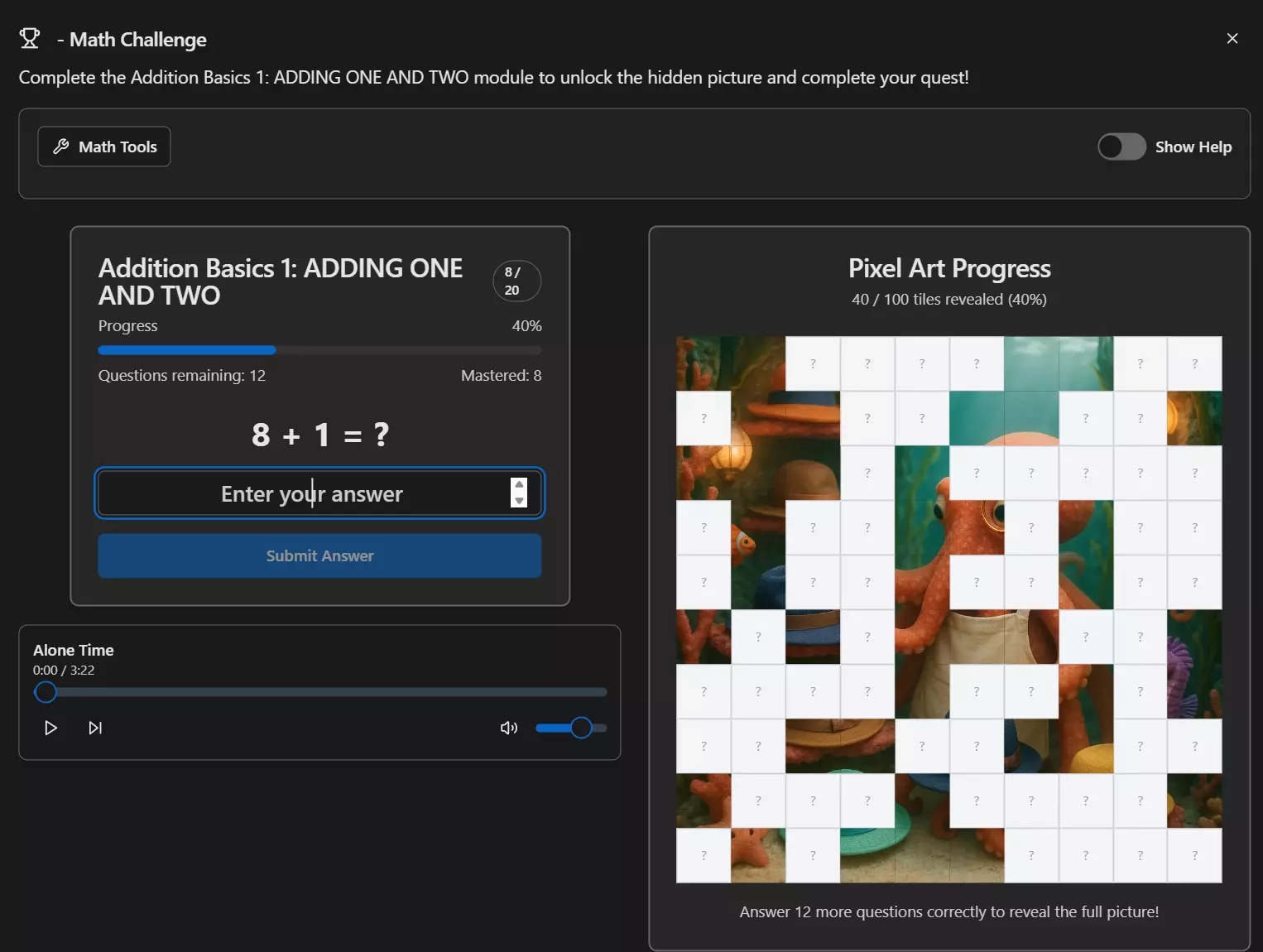
Pixel Art Math
Kids answer math questions and each correct answer reveals a tile of a hidden pixel art image. They race to uncover the full picture — turning practice into artistic discovery.
Seven configurable visual learning tools (blocks, number lines, 10-frames, arrays, and more) help kids understand problems visually. Admins enable tools per child — kids pick the one that clicks for them. Before answering, tools show the structure; after answering, the complete visual solution appears.
Set It and Forget It
The system automatically manages progression across 38 levels — adjusting difficulty, advancing content, and handling retry logic (wrong answers queue up to 3 reattempts). Parents configure once, the app does the rest.
Why Learning Modules Transform Education
Six key benefits for families
Education as Routine
Learning becomes part of daily quests, not separate homework battles. Kids complete education naturally as part of their routine.
Gamified Practice
Visual rewards, pixel art reveals, level progression, achievement tracking — practice feels like play, not work.
Deep Analytics
Detailed mistake patterns, accuracy trends, help usage monitoring — know exactly what they're mastering and what needs work.
Visual Learning Tools
Seven configurable tools (blocks, number lines, arrays) adapt to each child's learning style — configurable per child.
Flexible Configuration
Mixed operations, custom question counts, difficulty settings, training modes — adapt every aspect to fit your goals.
Automation Baked In
Set it and forget it. Modules automatically advance kids through new content — harder difficulty, new operations, the next verse — so parents never have to manually adjust.
Make Learning Part of the Quest
Kids level up their skills while earning coins and gems. You get detailed analytics on what they're mastering — and what needs more practice.